
Listen to YouTube when your internet is slow
Thinstream is a free extension for Chrome, Firefox and Safari. Press one button and the video drops to 144p and hides. You get the audio and a transcript that follows along.
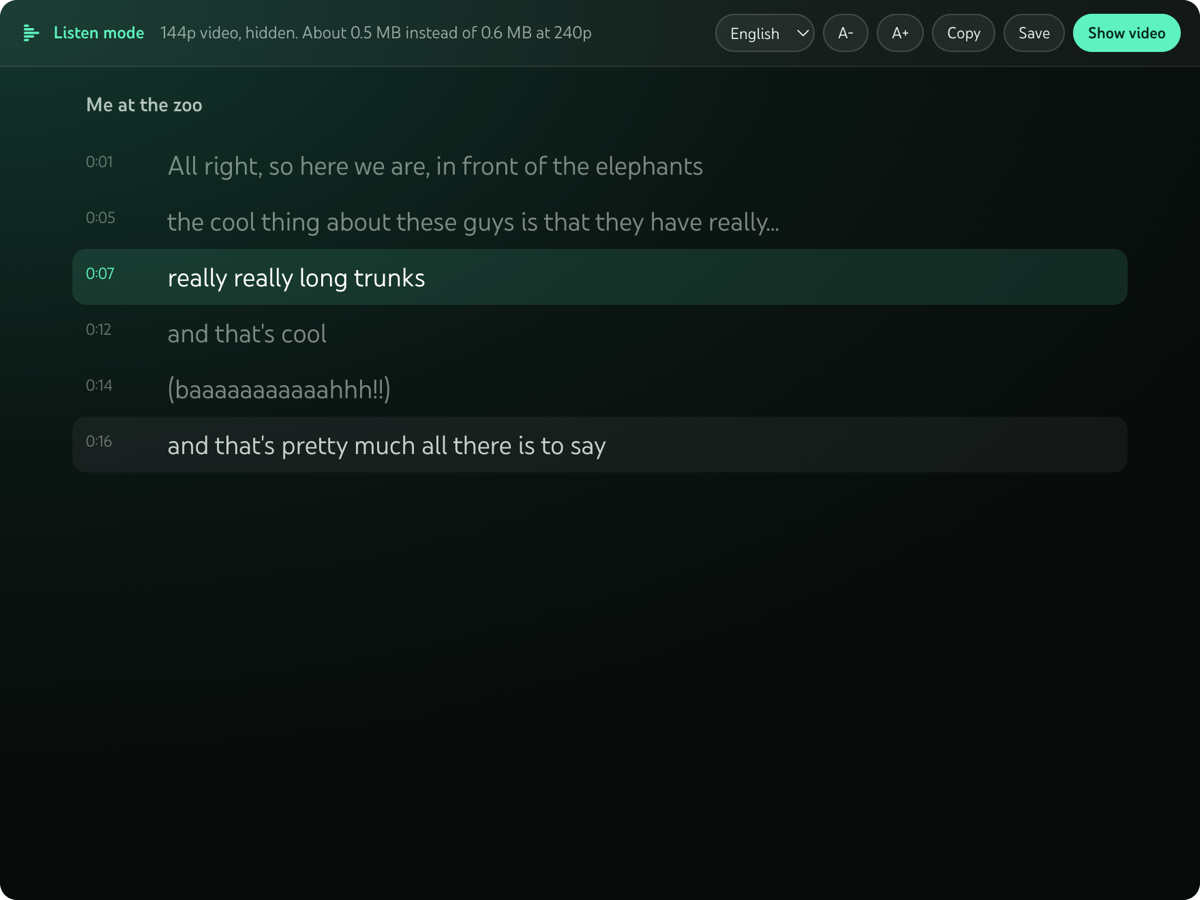
What it does
Holds 144p
The video stays at the lowest quality YouTube offers, on every video, until you turn it off.
Hides the picture
No blurry frame to stare at. The player becomes a reading view.
Transcript that follows
The current line is highlighted and scrolls with the audio. Click a line to jump there.
Your language
Pick any caption track the video has. Change text size, copy it, or save it as a text file.
Shows the saving
The panel tells you roughly how much data this video needs in listen mode and at normal quality.
Private
No account, no server, no tracking, no AI. It uses the captions YouTube already has.
How much data it saves
File sizes YouTube lists for one real video, Big Buck Bunny 60fps 4K (10 minutes 35 seconds), read on 2026-11-12. Video plus the standard audio track.
| How you watch | Data for the whole video | Compared with listen mode |
|---|---|---|
| Listen mode (144p, hidden) | about 15 MB | |
| 480p | 36 to 43 MB | 2 to 3 times more |
| 720p | 66 to 97 MB | 4 to 6 times more |
| 1080p 60fps | 134 to 268 MB | 9 to 18 times more |
The saving depends on the video. Calm lectures compress well, so the gap is smaller. It is not true audio only: YouTube's web player no longer offers a separate audio stream, so 144p is the floor.
Install
- Download
thinstream-chrome-1.0.4.zipfrom the latest release and unzip it. - Open
chrome://extensionsand turn on Developer mode. - Click Load unpacked and pick the unzipped folder.
- Open a YouTube video and press the Thinstream button in the player.
Works in Chrome, Edge, Brave and Arc. Firefox 140 or newer has its own zip: download it, open about:debugging, This Firefox, Load Temporary Add-on, and pick the zip. A Firefox Add-ons listing is on the way. For Safari on Mac, build the Xcode project in the repo. Full steps.
How it compares
| Tool | Price | Lowers data use | Hides video | Synced transcript |
|---|---|---|---|---|
| Thinstream | Free | Yes, holds 144p | Yes | Yes |
| Audio Only Youtube | Free | Aims for audio only | Yes | No |
| Music Mode for YouTube | Free | Lowers quality of hidden videos | Yes | No |
| YouTube Listen Mode | Free | Yes, a setting drops it to 144p | Yes | No |
| Transcript Mode for YouTube | Free | Not stated | Not stated | Yes |
| Vinegar | $1.99 | Has an audio only option | Replaces the player | No |
| Glasp YouTube Summary | Free tier, Pro $15 a month | No | No | Yes, with AI summaries |
| YouTube Show transcript | Free | No | No | Yes |
| YouTube Premium | $15.99 a month | Not stated | Background play | No |
Checked on 2026-11-12 from each tool's own page. Sources and the cases where another tool is the better pick are in the README.
Questions
How do I listen to a YouTube video without loading the video?
Install Thinstream, open the video and press the Listen mode button in the player. The video drops to 144p and is hidden, and you get the audio with a transcript.
How can I watch YouTube on slow internet or a small data plan?
Use listen mode. It holds every video at 144p. On a 10 minute test video that was about 15 MB instead of 66 to 97 MB at 720p.
Is there an audio only YouTube extension that still works?
Thinstream works on YouTube as of 2026-11-12, in Chrome, Firefox and Safari. It isn't true audio only, but it holds the video at 144p and hides it, so you get the audio and a transcript on very little data. See How it compares.
Does it download only the audio?
No. YouTube's web player no longer offers a separate audio stream, so 144p is the floor. On the test video the hidden picture was about 5 MB of the 15 MB.
Can I read a YouTube video instead of watching it?
Yes. Thinstream fills the player with the transcript, highlights the current line, and lets you copy it or save it as a text file.
What if a video has no captions?
Listen mode still works and the audio keeps playing. The panel tells you there is no transcript.
Does it need YouTube Premium or an account?
No.
Does it collect any data?
No. It makes no network requests of its own. Settings stay in your browser.
Does it block ads?
No. Ads still play. In listen mode they are muted, and a countdown shows when your video continues.
Which browsers does it work in?
Chrome and other Chromium browsers such as Edge, Brave and Arc, Firefox 140 or newer, and Safari on Mac through an Xcode project.
Does it work on iPhone?
An iPhone and iPad build is in the repo. It was tried on one iPhone through TestFlight on 2026-11-13 and worked. It is not on the App Store yet, and it only works on youtube.com in Safari, not in the YouTube app.
Is it free?
Yes, for any noncommercial use, under the PolyForm Noncommercial 1.0.0 license. It can't be sold or used to make money.